
Building Web Apps with Elm
Quickly get up to speed with Elm and learn functional programming by crafting a reactive web app step-by-step.
In this hands-on video course, you get step-by-step guidance and expert advice in an engaging format you won't find anywhere else. Discover the joy of writing front-end code that stays well-factored and easy to maintain as your web app grows!
 “... great ramp up from total beginner to building apps and having fun!” Evan Czaplicki, creator of Elm
 “This Elm course by @pragmaticstudio is excellent. If you want to go from 0 to 100 real quick with Elm I would highly recommend it.” Philip Brown
 “... a great way to get some traction with a super fun language.” James Edward Gray II
 “Buy this. I am betting big on Elm for front end development, and this is the best way to learn it.” Brian Hogan
Build a Real Elm Web App with Real Code
Learn the good parts of functional programming while pushing your web dev skills to a new level!
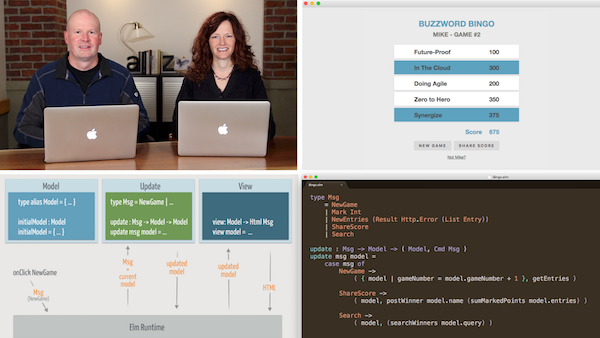
Elm is a functional programming language that compiles to JavaScript and runs in the browser. With its clean and readable syntax, world-class tooling, and super-friendly compiler, Elm is truly a delightful language.
Elm is also incredibly powerful and ready for the biggest projects. The Elm Architecture helps you create complex, modular web apps with code that stays easy to maintain as you add features. Toss in great performance, no runtime exceptions, and JavaScript interop, and you've got a super-charged way to produce reliable, scalable, and maintainable web apps.
But what we love most about Elm is that it lets you quickly build reliable web apps, which is exactly what we do in this course! By building an application incrementally and progressively using facets of Elm to accomplish specific goals, you'll gain a deeper understanding of both the how and the why of Elm development.
Learning this way makes everything "click"... and it's just more fun!
Course Outline
Videos just the way you like 'em: easy to digest, straight to the point, and paced for experienced developers.
Welcome! After taking a quick peek at the app we build in this course, we help you get your development environment set up so you can start coding Elm.
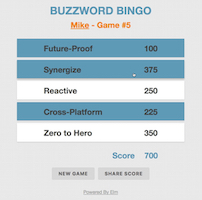
We start our journey in Elm land by creating a project and running our initial app in the Elm reactor, just to get a quick win. We also find out for ourselves if the Elm Runtime is really as fast as they say it is. (Spoiler: It is!)
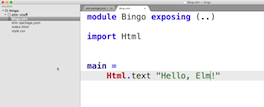
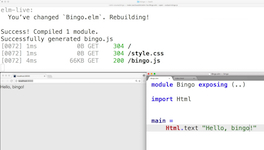
Next up, we put an efficient build process in place. We look at how to compile Elm code into JavaScript that runs either as a full-screen app or as a "component" embedded in an HTML element. We also set up elm-live to automatically recompile our Elm files whenever they change.
Functions are at the heart of everything we do in Elm. So we initially give 'em a try in the Elm REPL, and then chain multiple functions together using the pipe operator to start bringing our application to life. In the end you'll find yourself beginning to develop the mindset of functions as transformations.
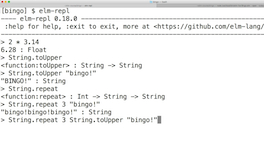
Elm functions are guaranteed to be stateless and free of side effects. We explore what that means as we define our own functions. We look quickly at basic function syntax (it's really clean!) and how to write anonymous functions in Elm.
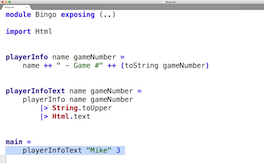
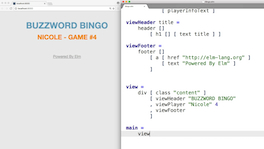
Elm doesn't have a separate templating language that renders HTML. Instead of writing markup, you just call Elm functions! And Elm's HTML package comes with a bunch of handy functions for rendering HTML. We dive into the initial view for our app using HTML package, qualified and unqualified package imports, let expressions, and nested view functions.
Elm is able to boast about not generating runtime exceptions in part because it's a statically-typed language with a world-class compiler. Initially, you can write code without declaring any types because the Elm compiler automatically infers types. But to truly be proficient with Elm, we need to go deeper and understand type variables, type annotations, and what's happening underneath all the inference.
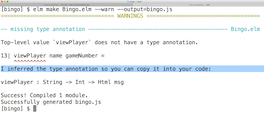
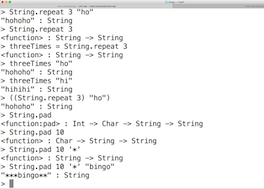
Why is the syntax for type annotations a series of arrows like String -> Int -> Html msg where the arrows are used to separate the arguments types and the return type? The short answer: all functions in Elm are curried so you don't need to pass all the arguments at once. Understanding how this works is a huge part of designing good Elm code, so don't skip this module!
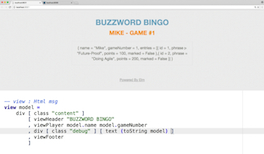
We laid a lot of groundwork so far designing the view of our app. Now we turn our attention to the application's state. In Elm, the state lives in a model and we use records to model application state.
Our type annotations are starting to clutter up our code with duplication. What we really need is a more expressive, shorthand way of referring to a record type. Type aliases to the rescue! As an added bonus, the type alias for a record gives us a record constructor and allows us to name things in the language of our domain.
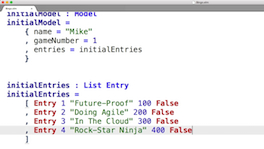
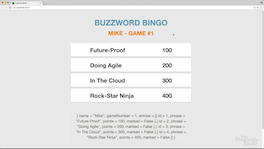
How are we going to render the collection of entries in our model into an HTML list? You might initially think to use a looping construct. But Elm doesn't have conventional loops. Hmmm... Elm forces us to think in terms of functions that can transform inputs into outputs, which turns out to be pretty sweet!
It's time to start making our app interactive! We need a way to update the model in response to user inputs and then maintain that application state. But wait... how can we do that if all our functions are stateless? Thankfully, the Elm Architecture offers an elegant and scalable answer.
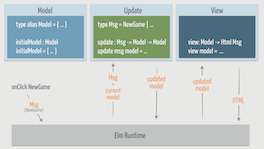
Our app now has three cleanly-separated parts: a model record, a set of nested view functions, and an update function. Understanding the design patterns and how these get wired together is essential. We examine how messages, union types, type constructors, case expressions, and pattern matching all play a role.
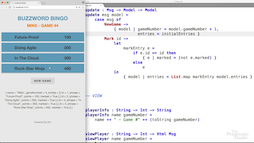
List manipulation is highly optimized in Elm (you use lists a lot), and the List module includes several powerful functions for transforming lists. Summing up the game points is a fun way to explore several of these functions. Learning to transform collections of values this way also begins to transform your mind more toward functional programming!
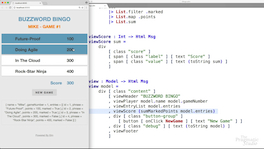
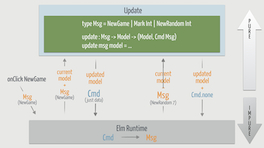
If Elm functions are stateless and can't have side effects, then how do Elm programs ever interact with the outside world or run code that generates inconsistent results? Turns out that Elm has a very clever way of letting us perform what it refers to as "managed effects."

Let's take our managed effects up a notch by fetching JSON from a backend API. To do this, we put together everything we've learned so far and also introduces us to the HTTP package.
Our API is sending back raw JSON and we need to transform the JSON into Elm values using something called a decoder. It's sort of like the secret decoder ring a superhero might use, and after this module you'll know all the secrets.
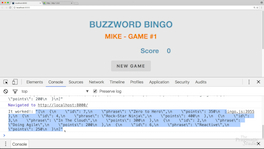
It's time to maybe take off our rose-colored glasses. We've been hanging out on the happy path long enough. So what happens if our backend API goes out to lunch and never returns? We look wide-eyed at handling errors, which seems better than just doing nothing.
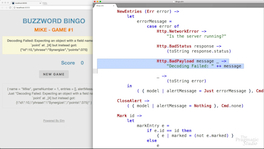
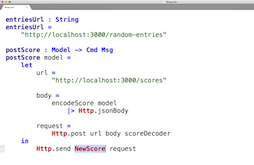
In addition to fetching data from the API, we also want to POST the player's name and score to the API. To do that, we dive deeper into the HTTP package and also learn how to encode Elm values into JSON values. In the end, you'll know how to have a two-way conversation with a backend API!
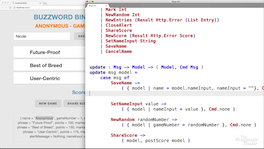
Designing our app to react to input fields raises a bunch of questions. Where should the contents of the input fields be stored until the user actually clicks the "Save" button? What happens if our user clicks the "Cancel" button instead? What if we want only certain input fields visible based on certain conditions? As we work through these various scenarios, we explore onInput handlers, onClick handlers, and how union types help us create a small state machine.
How you decide to organize your Elm code will ultimately depend on the specific application or package you're writing. If it's a small app, you could rightly leave all the code in a single file. If instead you want to break your code into multiple files, there are different ways of doing so. We show you some techniques we've found helpful for keeping code organized.
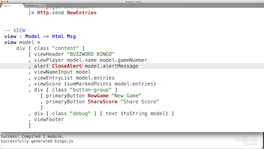
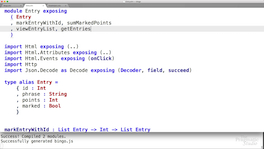
We've seen how we can organize code by extracting functions, and even putting those functions in a separate module that gets imported. We round out this course with one final (advanced) technique: using modules to break out a concept and design an abstraction that hides implementation details. In the end, you have a complete single-page web app designed the Elm way!
What You'll Get
Lifetime access to everything you need!
“I can't think of a better way to introduce someone to Elm and potentially even Haskell than through this course. The production quality is absolutely fantastic. I love that the videos are short as it makes them less intimidating. The decision on when to introduce the topics is really well thought out. Really well done!!”
Michael Niessner
For Experienced Developers
You've been around the block with other web stuff.
To respect your time in the videos, we assume you're already fluent in HTML, CSS, and have project-level experience with another programming language. However, we don't assume you have prior experience with functional programming or Elm.
Why should I learn Elm?
Push your front-end development skills to new heights!
We think learning Elm is well worth your time if you're one of the following kinds of developers:
You're new to functional programming
If you're simply curious about functional programming or you've struggled with FP concepts in another language, then you'll find Elm relatively easy to learn. Its syntax is clean and readable, and you can build practical stuff with it quickly. Elm is also a gentle gateway into other FP languages.
You're a front-end developer
If you're a front-end programmer who's weary of JavaScript and its tooling, then you absolutely owe it to yourself to check out Elm as an alternative. Elm code stays well-factored, and when it compiles then you know it works. No more runtime exceptions! And the tooling around Elm is an absolute delight to use.
If you're happy writing JavaScript, then you'll love hearing that you can use your favorite JavaScript library in Elm apps. You can send messages from Elm to JavaScript and vice versa using ports. In fact, interop with JavaScript is embraced by Elm.
You're a programming language enthusiast
If you just love learning new languages, then you'll really get a kick out of Elm. It's an innovative and well-designed language. Evan Czaplicki, the designer of Elm, drew inspiration from Haskell, OCaml, F#, and other ML-family languages and made it all approachable in Elm.
It's also easy to play around with Elm. One of the quickest ways to start writing Elm code is to jump in the online editor. There’s also a REPL for experimenting, and the Elm package catalog has a growing collection of community packages.
You want to become a better all-around programmer
And who doesn't want to push their programming skills to the next level? Learning Elm will make you think differently about programming, and as such you'll have a deeper well of expertise to draw from when solving your own programming challenges.
Created with 💛 by
Mike and Nicole Clark

Howdy! We're the friendly couple behind The Pragmatic Studio.
We've been making courses for developers since 2012. It's a privilege to get to teach together and serve everyone who supports us.
We discovered Elm in late 2014 while looking for something fresh and fun to learn over the holidays. At the time, Elm wasn't really on anybody's radar. But it had a special quality that kept drawing us back. And as we continued to use it, something unexpected happened: we ended up learning functional programming almost without trying! And as a result, we became better overall programmers. Elm has matured since then and has become a viable way to build web apps. It's no surprise why it's gaining in popularity.
As with all our courses,this is the course we wish we had when learning Elm. One that's easy to jump into, doesn't get bogged down in syntax minutiae, and focuses on building a real web app with Elm. We spent a ton of time distilling everything we know about Elm into a course that lets you pick up Elm in just a few hours. We hope you enjoy it!
Join thousands learning Elm!
Here's what some of them have to say…
 “Love this Elm tutorial. Time to write front end code again since I don't need to use JS.” Mike Gehard
 “Everything was explained really well, working up from very simple foundations. This course is very approachable for just about anyone!” James MacAulay
“I can't think of a better way to introduce someone to Elm and potentially even Haskell than through this course. The production quality is absolutely fantastic. I love that the videos are short as it makes them less intimidating. The decision on when to introduce the topics is really well thought out. Really well done!!” Michael Niessner
 “A great, practical introduction to Elm. Straightforward with a great ease-in approach to new concepts.” Jake Trent
 “The course was practical, informative and exceptionally well-paced. I love that pretty much as soon as a question sprung into my head you answered it. If there's a better way to learn Elm out there, I've not found it. Fantastic work!” Alan Gardner
 “This course is perfect! There is nothing you can do to make it better. The way you modularize the course in small chapters is just perfect. I have taken hundreds of video courses and I can say this is so far the best of all. You have the talent to do this, seriously you surprised me with this awesome content. Love you both!” Victor Hazbun
 “Mike Clark is an excellent teacher. He explains the concepts clearly and concisely... He introduces everything incrementally and at no point did I feel overloaded. Quite the opposite, there were a number of times when he displayed the uncanny ability to read the questions arising in my mind while going through the material... I love that this course was practical. We built a real application, while although simple, had similarities with something from the real world. The explanations were very clear and the course flowed from start to finish. Often the "Notes" sections following the videos dealt with the very questions that had been raised in the back of my mind during the video. I don't think this course could have been better.” Philip Poots' Full Course Review
 “I really enjoyed the videos and the pacing with bite-sized chapters and follow-up material. I credit this course for making me excited about Elm!” Paul Fioravanti
 “I looked at the Elm documentation and was lost, but with this course, I got a good base. I like that the incremental approach lets you take in the various concepts one at a time and build on them. I just fell in love with this FRP language and its way to build web apps. Thank you so much!” Denis Ricard
 “Great course, love the videos! It was a great top-to-bottom overview of the Elm language. The try-it-yourself part in the course notes is really great and I had a lot of fun refactoring code after the currying section.” David Kormushoff
 “...a fantastic tutorial to learn Elm. +100” Pradeep Gowda
 “Easy to understand, easy to follow! Great spoken English (especially for me as a German). Great animations and short illustrations! Thx for your work!” Jens Krause
“ elmCourse = Just "awesome". Fun and informative. ” Ty Walls
 “This is a detailed, well built, and perfectly presented course—the norm from The Pragmatic Studio.” Thom Parkin
 “This was a really good course and I enjoyed every part of it. It is a great entry point to reactive programming, bringing a fresh approach to building web apps. Thank you!” Filip Zrust
 “Simple enough to work through in a day. Exciting enough to motivate me to dig deeper.” Kenny Parnell
 “This is a perfect, succinct introduction that helps cement the idea that Elm is a usable language for the day-to-day.” Vitor Capela
 “Just finished learning #Elm course from @pragmaticstudio. Highly recommended to get started real fast!” Prasanna N
“I own every Pragmatic Studio course, and it is nice to see that the quality remains consistently high. I've used similar training products from other companies, but the quality and thoroughness are not always there. It is comforting to know I can buy new courses, as you release them, and know they're going to be great. It is also nice to know that I can recommend Pragmatic Studio to other developers with the utmost confidence that they will be amazed. I also appreciate the little extras you always provide, like your three-minute video on the Elm debugger. I'm just starting out with Elm, but I can already see how that could be extremely helpful. Thank you!” Clinton De Young
“This was a signature Pragmatic Studio course! Great quality with a good level of depth, pace, and solid example code. I also really appreciated how it didn't treat me like a child as those other ("interactive") websites do. Really good stuff!” Joris Vanhecke
“I did your course and I loved it! I tried learning Elm with some books and websites, but I always found them incomplete or too slow. Your course was really inspiring and easy to absorb, so I watched it twice and felt a powerful drive to start my new project in Elm! I'm in my third project now and wondering how it changed my life and it's all due to you!! I always recommend your course immediately to newcomers!” Gustavo Nunes Martins
“I love your training material. I have been a programmer now for over 20 years and your courses are by far the best stuff I have seen.” Eamonn O'Brien
“I did your course and I loved it! I tried learning Elm with some books and websites, but I always found them incomplete or too slow. Your course was really inspiring and easy to absorb, so I watched it twice and felt a powerful drive to start my new project in Elm! I'm in my third project now and wondering how it "changed my life" and it's all due to you!! I always recommend your course immediately to newcomers!” Gustavo Martins
“This is absolutely the best resource for learning Elm hands down! It’s very easy to understand.” Abraham Cuenca
“I really wanted to learn Elm but was intimidated. Now I look forward to building something!” Steve Freeman
“This is the BEST video series I have ever experienced. You have done a fantastic job of quickly, clearly and simply explaining the basics of Elm development. Thanks for a supremely enjoyable learning experience!” Jamey Cribbs
“This course was really awesome and now I feel like I understand the Elm ecosystem way better. I liked the step-by-step instructions with practical examples of when the given language features were really needed instead of a mechanical presentation style. The instructors were also very friendly and it's crystal clear that they love what they do!” Gabriel Schimit Ribeiro
“Each lesson was short, clear, and moved the needle by building skills step-by-step. Everything was anticipated. Really, really impressive.” Chris Jones
 “Elm + Awesome Trainers = Freaking Great Course on the Elm Language!!!! I have put this course on hold for such a long time but I'm very glad that I have finally gotten around to completing it. I'm always impressed with Mike and Nicole's attention to detail and this course is no exception here. They reinforce each video concept with exercises to boost one's understanding of the course content. If you're looking to take your frontend chops to the next level, then please do yourself a favor and learn the Elm Language the Pragmatic Studio Way!!!! 👏🏾🙏🏾👏🏾🙏🏾” Conrad Taylor
 “A very practical, hands-on approach to learning Elm. Great course overall!” Matthew Machuga
 “This course is really great. I expected an introduction focused solely on the language and less on building an app. However I do like it this way even more as I feel like I can actually build something with what you taught me now!” Sebastien Varlet
 “...loving the course on @elmlang! finally getting my head around this awesome #WebDev language!” Ian Taylor
 “Well done! This course is a great value for the money! It was straight to the point for developers with Javascript knowledge.” Misha Moroshko
 “Very well structured, anticipated all the important questions, and provided the "meta" view of working in Elm that most tutorials and books omit. Clearly the instructors know how to bring the right "aha!" moments in order to sustain an enthusiasm for finishing the course. Udemy has NOTHING on Pragmatic Studio. :) Great job!” Robert Calco
 “Your teaching style really hit home for me. It was impressively done. My mind was specifically blown by the explanation of currying and commands. Those two elements were things I had not fully groked in my self-study. You really bridged the gap! Thank you!” Geoff Lanotte
 “I love how you manage to make difficult concepts easier to grasp! And the duo presentation is much better than a single presenter droning on. Looking forward to the next one.” Hans Verschooten
 “I liked the fact that this Elm course gets straight into building something! It is difficult to learn to code when the language and syntax is taught in isolation. I didn't learn to code because I wanted to learn to code - I learned to code because I wanted to build websites. This was a great course!” Jack Lenox
 “Clear and professionally presented, enthusiastic speaker, well thought-out example. Top Notch!” Mark Orr
 “I very highly recommend this introductory video series on Elm...” Laurence Roberts
 “I have gone through other reference material and tutorials on Elm, but this one had a way of pointing out concepts in an extremely clear fashion. This course improved my understanding of some fundamental concepts that I thought I understood, but really just superficially used instead. Also, being able to download the videos was a huge plus.” Mike Ratliff
 “I feel like I understand functional programming now! I love how you don't go into details about concepts before you've shown and used them.” Bjarke Sørensen
 “Great intro to Elm for someone without a lot of functional programming background!” Max Baumann
 “The course was excellent and fun! Without this tutorial I wouldn't have gone this far into learning reactive web app programming. And certainly, not with Elm.” Elliot Kleiman
 “The honesty, modesty, intelligently-layered presentation and unhurried teaching skills of Mike Clark, plus the traditional excellence of Pragmatic Studio makes this a beautiful Elm intro for me. The Notes for each lesson rounded out everything. I also appreciate how quickly and sensitively each lesson was kept up-to-date the day after.” Victor Kane
“Loved the structure of creating an application while incrementally learning language features. I was already a huge React.js fan, so this feels like React on even-more-functional steroids.” Cale Newman
“I bought this course after trying out Elm a little bit on my own and found it incredibly useful! I especially loved the explanation of Elm coding and layout conventions, and how to read the documentation really early in the course. The speed was perfect with just enough explanation of technical concepts.” Kadi Kraman
“Mike does an incredible job of breaking down concepts and explaining things in a way that's not intimidating. Thanks for the great class!” Stacey Touset
“I liked the hands-on approach. You obviously put a lot of thought into the order you introduced concepts. You brought in new concepts only where they were immediately applicable to the problem at hand, and that made the whole progression from learning the basic syntax to completing the app feel natural and effortless.” Justin Silvestre
“This course will be fantastic launching pad for FP discussions with our team. Great job!” Wilkes Joiner
“I love learning new languages and this was a lot of fun! I liked the clear overview of the Elm language and gentle introduction to core concepts!” Rene Rubalcava
“The sections built on each other very well. I liked seeing the code being refactored as we went. It is nice to see the process and not just a finished product and some explanation. It also made me very happy to see the notes about the syntax change in newer versions of Elm.” Mike Shaheen
“Excellent teaching style. Very good course. Bottom line: after the course I am beginning to wrap my head around how programming in Elm works.” Robert Kass
“Normally, I dislike video training because it's too slow, but these two courses have convinced me that video, when well done, can be the best vehicle for getting myself plugged into a new technology or new concept. I credit your two courses for making Elm more accessible than it otherwise would have been.” Scott Smith
“I am starting to like the functional mindset and have you to thank for being my teachers!” Ian Gagorik
“This course is extremely well thought out and progresses in chunks and a pace that is ideal. After completing this course, I feel eager and well prepared to tackle an Elm project of my own design!” Ed Barstad
“Thanks for this great course! I really liked the practical, consistent example, as well as starting from something very simple to something moderately sized. Really great!” Lucas Dohmen
“This Elm course was excellent fun and informative. One of the best resources I've used for learning a language — thank you!” James Brown